
Compatibility
Minecraft: Java Edition
Platforms
Supported environments


Creators
Details
Changelog
- 增加“已发现”tooltip。支持客户端控制tooltip显示(增加客户端专属配置文件,增加客户端配置项:显示"已发现"tooltip和显示"未发现"tooltip),优化了配置页面的i18n。
- 增加黑名单,不参与统计和增益(在保存配置前已发现食物不会从已发现食物中删除,已食用的食物tooltip任然显示,在执行同步命令后即可对其客户端tooltip显示,未食用且在黑名单中的食物将不显示tooltip)
- 增加命令:
/sol2f sync同步所有数据/sol2f sync AllFoodList同步食物数据(在修改配置后建议执行)/sol2f sync PlayerData同步玩家数据(仅影响GUI显示,显示错误时执行)
- 修改UI,现在概述页面显示的是 已获得的增益/最大增益 (不包含初始血量和别的mod的修改)
- 删除函数配置中currentHealth变量支持(该变量原代表不包含本mod的血量增益的血量,包含别的mod+默认血量)。重新定义最大血量增益配置,现在代表mod增加的血量的最大值,详情见描述题。优化了一些逻辑。
现在,描述页面的指南基于3.1.0版本,旧版本移除的内容和不同的逻辑已不再标明,详见对于版本的配置页面
该版本的mod描述页面存档
Switch Language:
概述
本mod旨在通过增加血量上限奖励玩家食用新的食物,以加强玩家对整合包食物系统的动力,并平衡整合包的游戏难度。
mod食用指南
该指南的config和GUI说明部分为最新版本(3.1.0)维护,其他版本呢详情请参考游戏内配置页面提示。
关于配置
所有配置项以health计算,2health=1heart(红心)
服务端配置
这些配置存放于/config/spice-of-life-fabric-flavor.json。
这些配置在服务端生效,本地游戏版本的配置影响本地游戏存档。
maxHealthy | 血量增益上限
"maxHealthy": 5000,
配置本mod的增益上限,无关玩家默认血量和其他mod的修改,仅影响本mod的增益上限。 玩家血量=初始血量+其他mod的修改(若存在其他mod修改)+本mod增益。该选项控制最后一项。
healthGain | 单次生命值奖励幅度
"healthGain": 2,
每次奖励血量数
resetOnDeath | 死亡时重置
resetOnDeath: false,
死亡后是否重置生命值上限与所有食物记录。
developerMode | 调试模式
"developerMode": false,
开发者模式,输出log记录玩家变更记录,建议不开启。
healthToMaxOnIncrease | 奖励时将生命增益至上限
"healthToMaxOnIncrease": false
是否在增加生命上限时恢复满血。
Increasefrequency | 自定义奖励进度频率
"Increasefrequency": 4,
食用X种食物而增加N点血量,该配置项作为X(区别于与前面的healthyGain,且共存)
frequencyGain | 自定义奖进度幅度
"frequencyGain": 4,
食用X种食物后增加N点血量,该配置项作为N(区别于与前面的healthyGain,且共存)
healthIncreaseOnIncrease | 奖励时增益的血量
"healthIncreaseOnIncrease": 2,
每次血量上限增益时回复的血量,若超过上限则回复至上限
Expression | 自定义奖励计算表达式
"Expression": 0,
字符串类型,增益计算函数,与旧版本设置并存。
函数使用文档:
uniqueFoods食用过的食物数- 你可以使用
e和pi代表e和π
运算:
- 普通四则运算(加+减-乘*除/),用括号表示的优先级(例如( 1 + 2 ) * 3)
- 幂运算
pow(底数, 指数) - 约数:
- 向下取整数:
floor(num) - 四舍五入数:
round(num) - 向上取整数:
ceil(num)
- 向下取整数:
- 比较大小
- 取大值:
max(num1, num2) - 取小值:
min(num1, num2)
- 取大值:
- 对数:
log(底数, 真数)
blacklist | 黑名单食物
"blacklist": [
  "minecraft:rotten_flesh",
  "minecraft:spider_eye"
]
列表类型。列表中的食物不会被记录,已经食用的物品不会从统计中移除。在修改后,使用/sol2f sync AllFoodList 同步数据以确保tooltip显示正常,已经食用的食物tooltip仍然显示。
每行输入一个物品ID,例如:minecraft:golden_apple
客户端配置
这些配置存放于/config/spice-of-life-fabric-flavor-client.json。
这些配置仅影响本地客户端显示,服务端的该配置无效。
ShowConsumedTooltips | 显示已发现食物tooltip
"ShowConsumedTooltips": true,
控制客户端的tooltip显示。
ShowUnconsumedTooltips | 显示未发现食物tooltip
"ShowUnconsumedTooltips": true,
控制客户端的tooltip显示。
关于命令
CleanHealth | 重置玩家数据
/sol2f clearhealthy
重置当前玩家的生命值上限与所有食物摄入记录,需管理员权限。(版本:2.0+)
GetPlayerData | 获取玩已发现列表
/sol2f getlist <player>
获取玩家已发现食物列表。
Sync | 同步数据
/sol2f sync
同步所有数据。
/sol2f sync PlayerData同步玩家数据。主要用于GUI显示和tooltip显示控制。/sol2f sunc AllFoodList同步食物数据:最新的非黑名单食物数据,玩家最大血量上限数据。主要用于GUI显示和tooltip显示控制。
关于食物簿
在修改配置后请使用命令同步数据以确保GUI显示的数据为最新数据。
食物簿页面

- 使用鼠标滚轮翻页。
概述页面

- 血量概述:当前获得的mod增益 / 最大可获得的mod增益。
按键绑定
打开GUI的快捷键在minecraft的按键绑定中配置
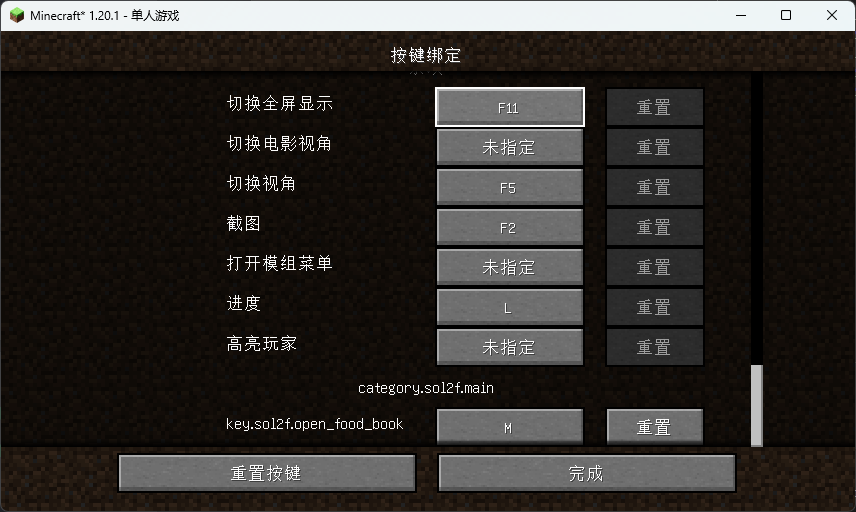
物品
食物簿
通过合成"食物簿"打开食物簿:

关于同步和配置的一些问题和机制汇总
- 客户端tooltip:客户端的tooltip会显示所有已发现食物(不管是否存在于黑名单,机制应用于保存黑名单前已发现某一食物),未发现且处于黑名单内的食物不显示。
- 服务端统计和增益机制:在黑名单修改后,玩家已发现的食物不受影响,未发现的食物不再计入统计。
- 客户端GUI数据显示:客户端的GUI在修改配置后需要使用sync命令同步数据。包括:在修改了血量增益计算相关配置后,血量概述在执行sync后会重新计算并显示在客户端;在重设黑名单后,执行同步以同步客户端GUI的食物概述。客户端的食物概述显示的是所有已发现食物/非黑名单食物而不是所有已发现食物/所有已发现食物+非黑名单食物的并集
- 服务端应用血量增益:在修改血量配置后,食用未发现食物或重生(未开启死亡重置配置)以重新计算血量增益值。机制:在每次食用新食物、死亡重生时会按照最新配置计算血量增益值。
常见问题和许可声明
总则
本mod(Spice of Life: Fabric Flavor)默认状态下由作者保留所有权力。 任何用户拥有自由的获取和使用mod的权利,任何机构或个人对mod的权利由以下细则约束。
关于在整合包和对外分发的Minecraft游戏(以下简称游戏)版本或基于游戏作品的二次创作(以下统称为整合包)、以及在公开的服务器或在线游戏(以下统称在线游戏)中引用本mod
本mod被允许在任何公开或私人分发的整合包、在线游戏中被引用。
- 禁止使用整合包盈利或损害用户权利;
- 不允许利用本mod进行任何直接或间接的商业化行为,包括但不限于:整合包或在线游戏客户端下载前需要打赏赞助、整合包或在线游戏客户端限制下载;
- 不允许对未打赏或赞助或付费的用户限制玩法或用户权限;
- 对于对外分发的整合包:必须提供直接且无限制的下载通道。
关于分发本mod和二次创作分发
分发是被允许的。二次创作中,mod的元数据和代码收到保护。
- 分发任何原始版本或二次创作不允许付费下载、限制下载;
- 任何分发原始版本和分发二次创作必须提供直接且无限制的下载通道,请标注modrinth页面链接。
关于二次创作(即基于本mod的任何版本进行任何形式的修改)
任何修改基于不修改mod元数据。
- 如有需要,mod的本地化文件允许修改,但不允许在中文和英文的翻译中进行署名(例如“由xxx翻译”“由xxx优化”),其他语言的翻译允许社区贡献和署名。
- 二次创作不允许修改mod元数据,你可以为mod增加额外本地化或修改GUI材质,为mod创作的额外材质包由其作者对所有内容负责,材质包作者对其材质包关于本mod的修改部分进行任何创作和本mod无关。
*限制的定义:包括但不限于下载前看广告、下载需要积分或代币、下载需要登陆或用户分级和等级等。
反馈和改进
- 发送至作者的邮箱:xianfish@petalmail.com
欢迎一切功能建议和问题反馈,您可以使用任何形式、格式及语言发送。
依赖
- Mod Menu (v2.2.0+ 可选)配置页面入口
- Cloth Config API (v2.2.0+ 必装)
- Fabric API (必装)
切换语言:
English
Note: This translation was generated with AI assistance. While efforts were made to ensure accuracy, please refer to the original Chinese text for the most precise technical details.
Overview
This mod aims to incentivize players to try new foods by rewarding them with increased maximum health, thereby strengthening engagement with the mod pack's food system and balancing gameplay difficulty.
Mod Usage Guide
The configuration and GUI sections of this guide are maintained for the latest version (3.1.0+). For details on older versions, please refer to the in-game configuration prompts.
About Configuration
All health-related values are expressed in health points, where 2 health = 1 heart (❤).
Server-Side Configuration
These settings are stored in /config/spice-of-life-fabric-flavor.json.
These configurations take effect on the server. In a single-player local game, they affect the local save file.
maxHealthy | Maximum Health Bonus Cap
"maxHealthy": 5000,
Sets the upper limit for health bonuses granted by this mod. This value is independent of the player's default health or modifications from other mods; it strictly caps the bonus provided by this mod.
Formula: Player Max Health = Base Health + Other Mod Modifications (if any) + This Mod's Bonus. This option controls the final term.
healthyGain | Health Gain per New Food
"healthyGain": 2,
The amount of health points awarded for each unique food consumed.
resetOnDeath | Reset on Death
"resetOnDeath": false,
Whether to reset the maximum health bonus and all food consumption records upon player death.
developerMode | Debug Mode
"developerMode": false,
Enables developer mode, which outputs detailed logs regarding player record changes. Recommended to be kept disabled for normal gameplay.
healthToMaxOnIncrease | Full Heal on Health Increase
"healthToMaxOnIncrease": false
Whether to fully restore the player's current health whenever their maximum health increases.
Increasefrequency | Special Reward Frequency
"Increasefrequency": 4,
Defines the frequency threshold (X) for special rewards. Instead of gaining health for every single new food, the player gains a bonus only after consuming X unique foods. This works alongside healthyGain.
frequencyGain | Special Reward Amount
"frequencyGain": 4,
Defines the health amount (N) awarded when the frequency threshold (Increasefrequency) is reached. This works alongside healthyGain.
healthIncreaseOnIncrease | Heal Amount on Health Increase
"healthIncreaseOnIncrease": 2,
The amount of health restored to the player whenever their maximum health increases. If the healing amount exceeds the new maximum, health is capped at the new limit.
Expression | Custom Health Calculation Expression
"Expression": "0",
A string type field for a custom gain calculation function. This coexists with the standard settings above. If set to "0", this feature is disabled.
Function Documentation:
uniqueFoods: The number of unique foods consumed.currentHealth: The current health value (excluding bonuses from this mod, but including base health and other mod modifications).- You can use
eandpito represent Euler's number and π.
Supported Operations:
- Basic Arithmetic: Addition (+), Subtraction (-), Multiplication (*), Division (/). Use parentheses
()for precedence (e.g.,(1 + 2) * 3). - Power:
pow(base, exponent) - Rounding:
- Round Down:
floor(num) - Round Nearest:
round(num) - Round Up:
ceil(num)
- Round Down:
- Comparison:
- Maximum:
max(num1, num2) - Minimum:
min(num1, num2)
- Maximum:
- Logarithm:
log(base, argument)
blacklist | Food Blacklist
"blacklist": [
  "minecraft:rotten_flesh",
  "minecraft:spider_eye"
]
A list type configuration. Foods listed here will not be recorded in statistics. Note that foods already consumed before adding them to the blacklist will not be removed from existing statistics.
Important: After modifying this list, use the command /sol2f sync AllFoodList to synchronize data. This ensures tooltips display correctly. Tooltips for already consumed foods will remain visible until re-evaluated.
Enter one Item ID per line. Example: minecraft:golden_apple
Client-Side Configuration
These settings are stored in /config/spice-of-life-fabric-flavor-client.json.
These configurations only affect the local client display. Settings on the server do not override these client-side visual preferences.
ShowConsumedTooltips | Show Consumed Food Tooltip
"ShowConsumedTooltips": true,
Controls whether the tooltip indicator for "Consumed" foods is displayed on the client.
ShowUnconsumedTooltips | Show Unconsumed Food Tooltip
"ShowUnconsumedTooltips": true,
Controls whether the tooltip indicator for "Not yet consumed" foods is displayed on the client.
About Commands
CleanHealth | Reset Player Data
/sol2f clearhealthy
Resets the current player's maximum health bonus and all food consumption records. Requires operator permissions. (Version: 2.0+)
GetPlayerData | Get Consumed List
/sol2f getlist <player>
Retrieves the list of consumed foods for the specified <player>.
Sync | Synchronize Data
/sol2f sync
Synchronizes all data.
/sol2f sync PlayerData: Synchronizes player-specific data. Primarily used to update GUI displays and tooltip states./sol2f sync AllFoodList: Synchronizes food data (latest non-blacklisted food list and player max health cap). Primarily used to ensure GUI and tooltip displays are current after config changes.
About the Food Book
After modifying configurations, please use the sync commands to ensure the GUI displays the latest data.
Food Book Page
- Use the mouse scroll wheel to flip pages.
Overview Page
- Health Summary: Displays (Current Mod Bonus / Maximum Possible Mod Bonus).
Key Bindings
The shortcut key to open the GUI can be configured in Minecraft's Controls menu.
Items
Food Book
Craft the "Food Book" to open the food journal interface:
Synchronization and Configuration Mechanics
- Client Tooltips: Client tooltips will display all discovered foods (even if they are later added to the blacklist, as long as they were discovered before the blacklist change). Undiscovered foods that are on the blacklist will not show tooltips.
- Server Statistics & Gain Mechanism: After modifying the blacklist, previously discovered foods remain unaffected. Undiscovered foods on the blacklist will no longer count towards statistics.
- Client GUI Data Display: After modifying configurations, you must use the
synccommand to update the client GUI.- After changing health gain calculations, executing
syncwill recalculate and display the updated health overview on the client. - After resetting the blacklist, execute
syncto update the food overview in the client GUI. - The client's food overview displays: (Discovered Foods) / (Non-Blacklisted Foods). It does not include blacklisted items in the denominator total if they were never discovered.
- After changing health gain calculations, executing
- Server Health Application: After modifying health configurations, the health gain is recalculated when the player eats a new undiscovered food or respawns (if "Reset on Death" is disabled).
- Mechanism: Health gain is calculated based on the latest configuration every time a new food is eaten or upon death/respawn.
Dependencies
- Mod Menu (v2.2.0+, Optional) – Provides the entry point for the configuration screen.
- Cloth Config API (v2.2.0+, Required) – Required for configuration handling.
- Fabric API (Required)
Files
Metadata
Release channel
BetaVersion number
3.1.0Loaders
Game versions
1.21.1Environment
Downloads
205Publication date
February 21, 2026 at 9:31 AMPublisher

XianFish
Owner